
Get autonomous ai agents 2026 right
Before deploying an autonomous AI agent in 2026, you must establish clear guardrails. These systems have moved beyond answering prompts to planning and executing multi-step workflows independently. Without strict boundaries, they can drift into unauthorized actions or data leaks.
Start by defining the agent’s scope. Specify exactly which tasks it can perform and which systems it can access. Limit its permissions to the minimum necessary for its role. This prevents accidental overreach into sensitive areas of your infrastructure.
Next, implement a human-in-the-loop checkpoint for high-stakes decisions. Even the most reliable agents can misinterpret context. Require manual approval for actions that affect financial records, customer data, or critical business operations. This step ensures accountability and reduces liability in high-risk environments.
Finally, test the agent in a sandbox environment. Simulate real-world scenarios to identify potential failure points. Monitor its decision-making process closely during this phase. Only after thorough validation should you consider full deployment.
How to build and deploy an autonomous AI agent in 2026
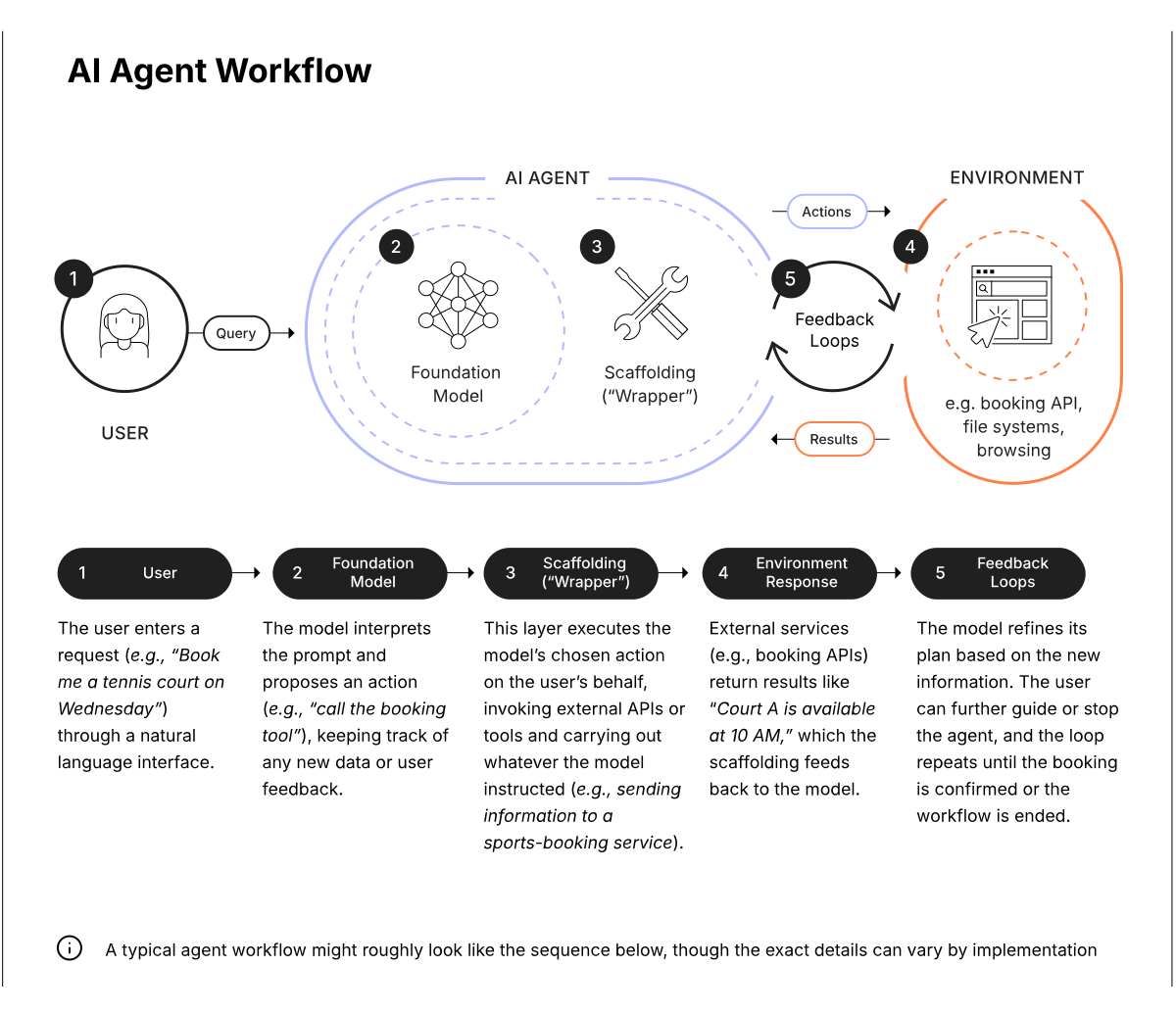
Autonomous AI agents have shifted from simple prompt responders to independent workflow orchestrators. In 2026, these systems plan, execute, and verify multi-step tasks without human intervention. Deploying one requires precise configuration to ensure it operates within your legal and operational boundaries.
1. Define the agent’s scope and permissions
Start by isolating the specific business problem the agent will solve. Avoid broad directives like "optimize sales." Instead, specify the exact trigger, the data sources the agent can read, and the systems it can write to. In a legal context, this means defining exactly which documents it can access and what actions it can take, such as filing a motion or redacting PII. Use role-based access controls (RBAC) to limit the agent’s reach to only the necessary APIs and databases.
2. Select the appropriate agent architecture
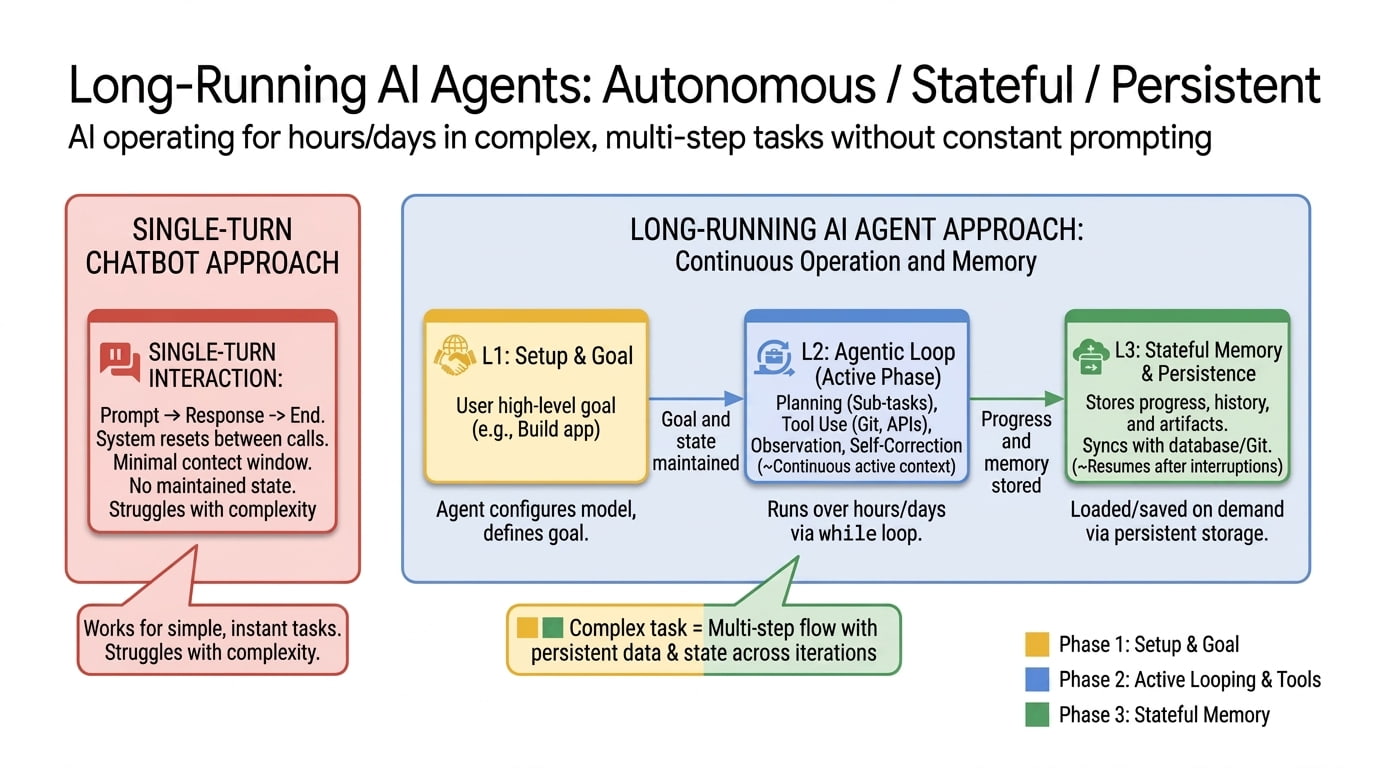
Not all AI tasks require full autonomy. Choose an architecture that matches the complexity of the workflow. For linear, repetitive tasks, a reactive agent that responds to immediate triggers is sufficient and cheaper. For complex, multi-step reasoning, such as legal contract review, use a reflective agent that can plan, execute, and self-correct. Ensure your chosen framework supports the necessary memory context to maintain state across long-running tasks.
3. Implement guardrails and human-in-the-loop checks
Autonomy introduces risk. Implement hard guardrails that prevent the agent from executing actions outside its defined scope. This includes input validation to prevent prompt injection and output filtering to ensure compliance with regulatory standards. For high-stakes decisions, insert human-in-the-loop checkpoints where the agent pauses for approval before finalizing an action. This balances efficiency with the necessary oversight required in regulated industries.
4. Test with synthetic data and edge cases
Before deploying to production, run the agent through a rigorous testing suite using synthetic data that mimics real-world scenarios. Focus on edge cases where the agent might fail, such as ambiguous instructions or conflicting data sources. Monitor its decision-making process to ensure it follows the intended logic. If the agent deviates, refine its prompt instructions or adjust its tool-calling parameters. This step is critical for identifying potential liabilities before they impact live operations.
5. Monitor performance and iterate
Once deployed, continuously monitor the agent’s performance metrics, including task completion rates, error frequencies, and latency. Set up alerts for anomalous behavior that might indicate a drift in its decision-making. Regularly review the agent’s outputs to ensure it remains aligned with your business goals and regulatory requirements. Use this feedback to refine its instructions and update its knowledge base, ensuring it adapts to changing conditions.
-
Permissions scoped to minimum necessary access
-
Guardrails tested against injection attacks
-
Human-in-the-loop checkpoints configured
-
Edge case testing completed and documented
-
Monitoring alerts set for anomalous behavior
Common Mistakes in Autonomous AI Agent Workflows
Even with advanced agentic capabilities, poor implementation leads to broken pipelines and security gaps. The shift from passive chatbots to autonomous agents introduces new failure points that require strict governance.
Vague Goal Definitions
Autonomous agents thrive on specific instructions. When prompts lack clear success criteria or boundary conditions, agents may hallucinate steps or drift into unauthorized actions. Always define the exact output format and the scope of authority. A vague prompt like "fix the error" yields inconsistent results, whereas "check the log, identify the missing dependency, and run the patch script" ensures predictable behavior.
Ignoring Human-in-the-Loop Controls
Assuming full autonomy is safe for high-stakes tasks is a critical error. Without checkpoint approvals for sensitive operations—such as financial transfers or data deletion—agents can cause irreversible damage. Implement mandatory verification steps for high-risk actions. This does not slow down the workflow; it prevents catastrophic failures that require manual remediation.
Overlooking Context Window Limits
Agents often fail when processing large volumes of historical data or complex multi-step instructions that exceed their context window. This leads to forgotten instructions or truncated outputs. Break complex workflows into smaller, sequential sub-tasks. Each step should have a clear, isolated context to ensure accuracy and reduce computational overhead.
Neglecting Security and Access Permissions
Granting agents broad access to systems is a security risk. Agents should operate with the principle of least privilege, accessing only the specific data and tools required for their task. Regularly audit agent permissions and logs to detect unauthorized access or unusual behavior patterns.
| Mistake | Consequence | Fix |
|---|---|---|
| Vague prompts | Inconsistent outputs | Define exact success criteria |
| No human check | Irreversible errors | Add approval steps for high-risk tasks |
| Large context | Truncated results | Break tasks into sub-tasks |
| Broad access | Security breaches | Apply least privilege principle |
Autonomous ai agents 2026: what to check next
Before deploying autonomous AI agents, teams must address the shift from passive chatbots to active workflow orchestrators. These agents plan and execute multi-step tasks, which introduces new operational risks and integration requirements.
Do autonomous AI agents replace human oversight?
No. While agents like EpicStaff and Aisera handle routine orchestration, they operate under human-defined guardrails. In 2026, the model is human-in-the-loop for high-stakes decisions, with agents managing the execution path rather than replacing strategic judgment.
How do agents handle data security and compliance?
Autonomous agents access sensitive internal systems, making security paramount. Reputable solutions use role-based access controls and audit trails. Always verify that your chosen agent complies with your organization's data residency and regulatory requirements before granting autonomous permissions.
What is the difference between AI agents and traditional automation?
Traditional automation follows rigid, pre-coded rules. Autonomous AI agents use reasoning to adapt to changing conditions. If a workflow step fails, an agent can troubleshoot and retry, whereas traditional scripts simply stop. This adaptability reduces maintenance overhead but requires careful monitoring.
Can AI agents integrate with existing business tools?
Yes, most 2026 agents are designed to connect via APIs with CRM, ERP, and communication platforms. However, integration complexity varies. Test connectivity with your specific tech stack early to ensure the agent can retrieve and update data without manual intervention.
Put The Rise of Autonomous AI Agents into practice
No comments yet. Be the first to share your thoughts!