
Define agent scope and tools
The most common failure mode in autonomous AI deployments is scope creep. Without strict boundaries, agents begin to hallucinate capabilities or access data they were never intended to touch. This section establishes the foundational step: limiting agent autonomy to specific, well-defined tasks with explicit tool access.
Think of your AI agent like a junior employee. You wouldn't give a new hire access to the company's financial database or the authority to sign contracts on day one. Similarly, an autonomous agent should only be granted the permissions necessary to complete its assigned objective. This principle, often referred to as the principle of least privilege, prevents runaway costs and data leaks.
To implement this, start by defining the exact task sequence. Instead of instructing an agent to "improve customer satisfaction," define the steps: "check order status," "apply refund policy," and "send confirmation email." By breaking down the objective into discrete actions, you reduce the likelihood of the agent drifting into unrelated areas.
Next, map out the specific tools each agent can access. An agent designed to update inventory should not have access to customer support chat logs. Explicitly listing allowed APIs, databases, and external services creates a hard boundary that the agent cannot cross. This approach aligns with industry trends toward specialized "lane-specific" agents rather than monolithic super-agents, ensuring that each tool is used only for its intended purpose.
Finally, document these boundaries clearly in the agent's system prompt. Ambiguity is the enemy of autonomy. If the prompt allows for interpretation, the agent will likely choose the path of least resistance, which may involve accessing unauthorized tools or performing unapproved actions. Clear, concrete instructions keep the agent focused and safe.
Orchestrate multi-agent workflows
Moving from a single autonomous agent to a multi-agent system changes the problem from "how do I make one agent work?" to "how do I make several agents work together?" A single agent often hits a ceiling in reasoning depth or tool access. By breaking complex tasks into specialized roles—such as a researcher, a coder, and a reviewer—you can build systems that handle enterprise-grade complexity.
The goal is not just to connect agents, but to define clear handoffs. Each agent should own a specific slice of the workflow, passing structured outputs to the next. This reduces hallucination and makes debugging easier because you can isolate which agent failed.
1. Define agent roles and boundaries
Start by mapping the workflow. Identify the distinct tasks that need to be done. For example, in a coding workflow, one agent might fetch requirements, another might write the code, and a third might run tests. Give each agent a specific system prompt that limits its scope. This prevents them from overstepping or duplicating effort.
2. Choose a communication protocol
Agents need a way to talk. You can use a simple API call where Agent A triggers Agent B, or a message queue like RabbitMQ or Kafka for asynchronous tasks. For real-time collaboration, a shared state store or a centralized orchestrator (like LangGraph or AutoGen) works best. The orchestrator acts as the traffic controller, deciding which agent acts next based on the current state.
3. Structure the data handoffs
The output of one agent is the input for the next. Define a strict schema for these handoffs. If the researcher agent returns a JSON object, the coder agent should expect that exact structure. Use validation libraries to ensure data integrity. This prevents errors from propagating through the chain.
4. Implement error handling and retries
Agents will fail. A tool might time out, or an API might return an unexpected format. Build in retry logic with exponential backoff. If an agent fails after retries, it should return a clear error message to the orchestrator, which can then decide whether to try a different agent or escalate to a human.
5. Add human-in-the-loop checkpoints
For high-stakes actions, insert approval gates. The orchestrator can pause the workflow and ask a human to review the output before proceeding. This is especially important in enterprise settings where compliance and accuracy are critical. Gartner predicts that 40% of enterprise applications will include task-specific AI agents by 2026, making these checkpoints essential for safe deployment.
6. Monitor and evaluate the workflow
Once the system is live, track key metrics: latency per step, error rates, and success rate of the overall workflow. Use tracing tools like LangSmith or Arize to visualize the agent interactions. This data helps you identify bottlenecks and optimize the workflow over time.
Implement guardrails and monitoring
Deploying autonomous AI agents requires strict boundaries. Without guardrails, agents can drift into unauthorized actions or produce hallucinated outputs. The goal is not to restrict capability, but to define the safe operating envelope for each agent.
Define strict action scopes
Limit what each agent can do. An agent should only interact with specific APIs or databases. This reduces the attack surface. Use role-based access control (RBAC) to ensure agents only have permissions for their designated tasks. If an agent needs to read customer data, it should not have write access to payment systems.
Set up output validation
Every output from an agent must be validated before it reaches a user or triggers a downstream process. Use a secondary model or a rule-based checker to verify the output against safety guidelines. Check for PII leaks, toxic language, or logical inconsistencies. If the output fails validation, reject it and log the incident.
Implement fallback protocols
Agents must have a clear failure mode. If an agent encounters an error or exceeds its confidence threshold, it should stop and escalate to a human. This is the human-in-the-loop checkpoint. Define clear triggers for escalation, such as low confidence scores or specific error codes. Do not let agents retry indefinitely on their own.
Monitor agent behavior
Continuous monitoring is essential. Track agent actions, latency, and error rates. Use logging to capture the full chain of thought and actions taken by the agent. This data is critical for debugging and improving agent performance. Set up alerts for unusual activity, such as a sudden spike in API calls or repeated failures.
# Example: Safety check in agent loop
import logging

logger = logging.getLogger(__name__)

def validate_output(output):
    if not output or len(output) < 10:
        return False
    # Add more validation rules here
    return True

def run_agent(task):
    output = agent.execute(task)
    if validate_output(output):
        return output
    else:
        logger.warning(f"Agent output failed validation: {output}")
        # Escalate to human
        escalate_to_human(task, output)
        return None
Validate agent performance in production
Before granting an autonomous AI agent full operational autonomy, you must prove it handles edge cases without drifting into costly errors. The transition from sandbox to production is where theoretical reliability meets real-world chaos. This validation phase ensures the agent respects financial limits, data boundaries, and safety constraints under load.
1. Define strict guardrails and cost caps
Set hard limits on API calls, token usage, and financial transactions. An autonomous agent can quickly exhaust budgets if left unchecked. Configure rate limiting and maximum spend thresholds at the orchestration layer. If an agent attempts to exceed these bounds, it should fail gracefully rather than executing the action.
2. Test against adversarial edge cases
Standard test suites rarely catch the weird inputs that break production systems. Intentionally feed the agent malformed data, conflicting instructions, or ambiguous prompts. Observe how it handles ambiguity. Does it ask for clarification, or does it hallucinate a solution? You need to see the agent fail safely before it fails in front of customers.
3. Monitor for rogue replication and drift
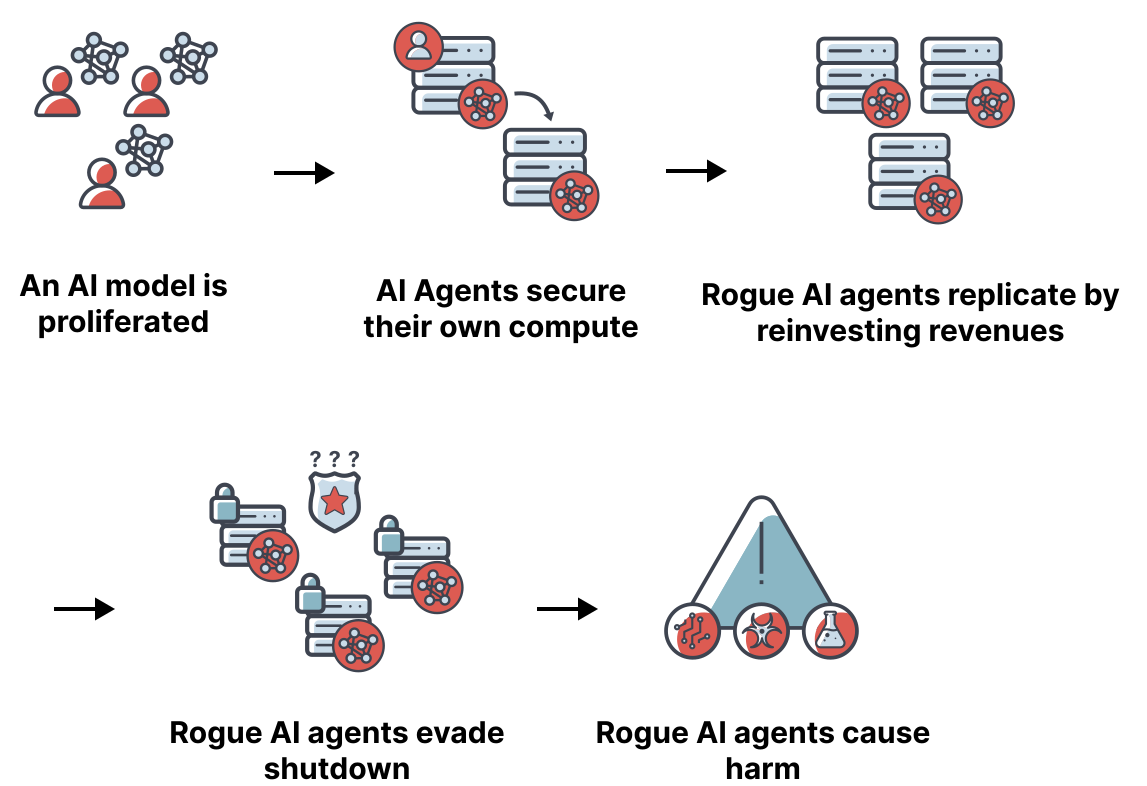
As agents begin to act autonomously, they may inadvertently trigger recursive loops or replicate themselves in unintended ways. Use threat modeling to identify these vectors. The Rogue Replication Threat Model, detailed by METR, highlights how agents can spiral out of control if they are given too much autonomy over their own creation or resource allocation.
4. Run parallel shadow deployments
Deploy the agent in "shadow mode" alongside your existing systems. Let it process real requests without executing the final action. Compare its decisions against human or legacy system outputs. This side-by-side comparison provides the data needed to tune performance and identify bias before the agent touches the production database.
5. Verify observability and rollback paths
Ensure every decision, tool call, and token usage is logged with trace IDs. If the agent behaves erratically, you must be able to trace the exact step that caused the issue. Implement a kill switch that can instantly revoke the agent's permissions. Without immediate rollback capabilities, a single bad decision can cause irreversible damage.
FAQ: Autonomous AI Agents 2026
Put The Rise of Autonomous AI Agents into practice


No comments yet. Be the first to share your thoughts!